Remote Control for TV , All TV
Betasoft MobileTools
4.4851.00 Reviews
- Version
- 2.5.2
- Installs
- 1.00M
- Age Rating
- Everyone
Screenshots
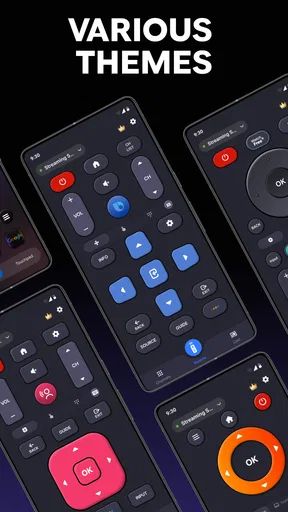
Our Review of Remote Control for TV , All TV
 Analysis by Appyee
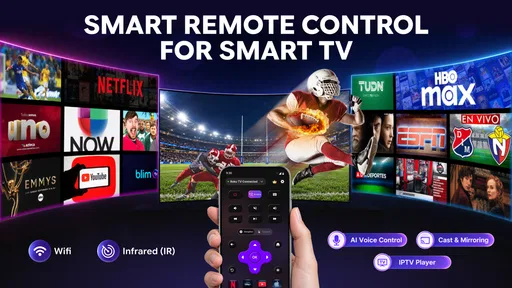
I find TV-remote apps most useful when the network is part of the plan, not an afterthought. A phone can be close at hand while the physical remote is buried or out of reach, but a remote app still depends on the connection method available to your television and phone. Remote Control for TV, All TV is designed to work with TVs through Wi-Fi or infrared, giving it two possible routes rather than tying the idea to one kind of connection. That flexibility is appealing, though the best choice for a particular setup depends on the devices involved.
For Wi-Fi control, the practical starting point is to check that the phone and TV can communicate on the home network. If the TV is not detected, I would first check the network connection and whether both devices are on the same local network, then reopen the app and try again. A guest network or a router setting that separates devices can get in the way of discovery even when both devices appear to have internet access. That kind of hiccup is a reminder that “connected to Wi-Fi” does not always mean “able to find each other.”
Where the connection makes the difference
Infrared control has a different trade-off: it relies on compatible infrared hardware and a clear path between the phone and the TV. It can be handy in a room where the TV is not easy to reach over Wi-Fi, but it is not a universal fallback for every phone. Before building a routine around it, I would check whether the phone itself can send infrared signals. If it cannot, the Wi-Fi route is the relevant one to test.
That distinction matters when choosing a remote app. A manufacturer’s own app may be a better fit if you want deeper control over that brand’s connected-TV features, while a physical universal remote can be more dependable for a household that does not want phone or network involvement. This app’s attraction is convenience across TV setups, not a promise that every model behaves identically. I would treat the first pairing as a compatibility check rather than assume every button will map perfectly on every television.
Useful in more than one room
The mobile advantage is clearest in ordinary situations: I can keep my phone nearby while cooking, pause a show without searching for the remote, or adjust the volume when the remote has slipped behind furniture. If there are several TVs at home, having a phone-based option can also reduce the number of remotes I need to keep track of. Still, I would label or remember each TV clearly in the app, because selecting the wrong room’s set is an easy mistake when moving around the house.
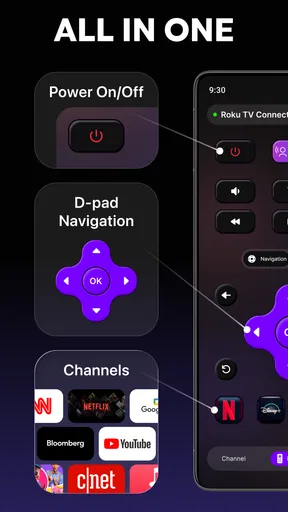
There is a small but useful habit that makes this kind of tool less frustrating: test the controls you rely on before settling in. I would check power, volume, navigation, and any text-entry option while standing near the television. If the connection drops later, that quick check helps distinguish a temporary network problem from a control that was never supported as expected. It also avoids the familiar annoyance of discovering a limitation halfway through a film.
Getting Started with Remote Control for TV, All TV
Setting up the Remote Control for TV, All TV app was surprisingly easy. I was a bit skeptical at first, thinking it might involve some complicated pairing process, but boy, was I wrong! All you need is a smartphone and a Wi-Fi connection. Just download the app from your app store, and you’re good to go.
The user interface is super intuitive. It’s like they knew exactly what I wanted—no unnecessary buttons or confusing menus. You just open the app, select your TV brand, and voila! The app scans for your TV, and once it finds it, you’re in control. It supports a wide range of TV brands, so chances are, your TV is on the list.
Features That Stand Out
Now, let’s talk features. One of the coolest things is the universal compatibility. Whether you have a Samsung, LG, Sony, or any other major brand, this app has you covered. It’s like carrying a universal remote in your pocket. Plus, you can control multiple TVs if you have more than one at home.
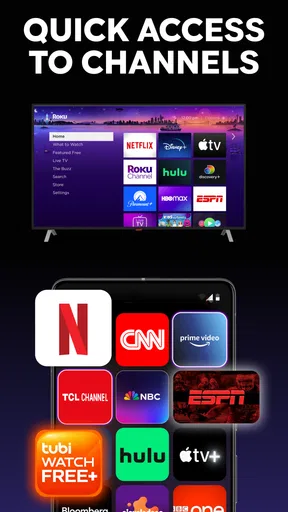
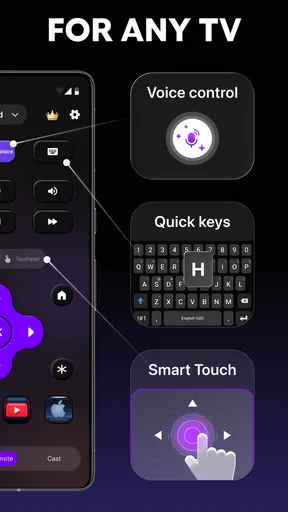
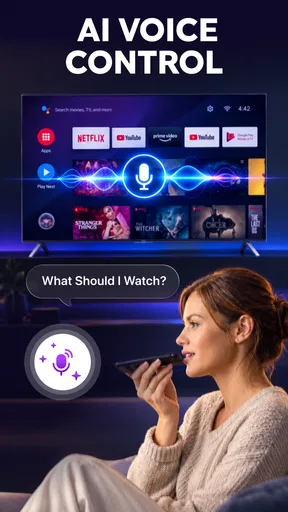
Another feature I love is the voice control. Sometimes, I’m too comfy on the couch to bother with buttons, so I just tell my phone what to do! “Turn up the volume” or “Switch to Netflix”—it’s all doable with just a few words. It feels like living in the future.
"Why fumble with remotes when you can just speak your mind?"
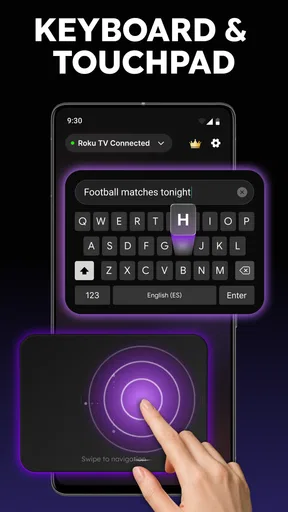
The app also includes a keyboard feature. This is a lifesaver when you’re searching for something on YouTube or entering passwords. Typing on a TV screen with a traditional remote is a nightmare, but with this app, it’s as easy as texting.
Choosing it for the right setup
I would recommend this to someone who wants a handy backup and is comfortable using a phone as a controller. It suits a home where a TV is regularly used for streaming and typing, or where the original remote often goes missing. It is less compelling if the television is rarely connected to the home network, the phone lacks infrared hardware and Wi-Fi control is unsuitable, or the household prefers a remote with physical buttons that can be grabbed without unlocking a phone.
Compared with the remote that came with the TV, the phone gives me a keyboard and keeps the control surface close by, but it also introduces another device that must be charged and available. Compared with a brand-specific TV app, a universal option is appealing when there are different sets around the home; a dedicated app may still be preferable when you want controls tailored to one manufacturer’s ecosystem. I see this as a useful second route to the TV, rather than a reason everyone should discard their original remote.
Small habits that prevent setup frustration
If a television does not appear during setup, I would avoid repeatedly changing settings at random. First confirm that the TV is on and connected to the intended network, then check the phone’s connection and try discovery again. If the phone has infrared capability, testing that route can be a sensible alternative; if it does not, there is no point expecting infrared control from that handset. These checks make the source of a problem easier to identify.
For a shared home, I would also keep the phone’s screen awake only when needed and make sure the correct TV is selected before tapping controls. That sounds obvious, but it matters when more than one set is available: a volume change meant for the living room can otherwise affect a different TV. When guests are visiting, the app can serve as a quick backup, but I would keep the regular remote accessible too, especially if someone else needs to operate the television without borrowing my phone.
Network use is worth considering if you are cautious about connectivity or simply want fewer devices involved. Wi-Fi control requires the phone and television to communicate over the local network, so it is not the same as a traditional remote sending a direct button signal. I would use it on a trusted home connection and avoid assuming that a public or isolated guest network will allow device discovery. For a TV in a room with unreliable Wi-Fi, a compatible infrared setup or a physical remote may be the more straightforward choice.
What to expect from the app itself
Remote Control for TV, All TV is a free tools app from Betasoft Mobile. It has an average rating of 4.4 from around 33,000 ratings and more than 1 million installs, which suggests that many people are looking for this kind of phone-based control. The current version is 2.5.2, it is rated for Everyone, and it runs on Android 7.0 or later. Those details make it approachable for a broad range of users, but compatibility still comes down to the particular phone, television, and connection method.
The app includes in-app purchases ranging from $3.99 to $39.99 per item. I would start by checking whether the basic remote functions work with my own TV before deciding whether any paid option is worthwhile. A purchase is only useful if it solves a need I actually have; for simple volume and navigation, I would not pay just because an option is visible. People who want to avoid in-app spending altogether should take that into account before making the app their only remote.
A practical evening test is more revealing than a quick glance at the interface. I would connect the phone and TV, try changing channels or inputs, enter a short search with the keyboard, then leave the app and return to it. That checks the everyday actions that matter and whether reconnecting feels manageable. If a connection fails mid-use, I would first reopen the app and verify the network before repeating setup. If it continues to be unreliable, switching to the TV’s own remote is the sensible recovery plan, not a reason to troubleshoot indefinitely.
Features That Stand Out
Now, let’s talk features. One of the coolest things is the universal compatibility. Whether you have a Samsung, LG, Sony, or any other major brand, this app has you covered. It’s like carrying a universal remote in your pocket. Plus, you can control multiple TVs if you have more than one at home.
Another feature I love is the voice control. Sometimes, I’m too comfy on the couch to bother with buttons, so I just tell my phone what to do! “Turn up the volume” or “Switch to Netflix”—it’s all doable with just a few words. It feels like living in the future.
"Why fumble with remotes when you can just speak your mind?"
The app also includes a keyboard feature. This is a lifesaver when you’re searching for something on YouTube or entering passwords. Typing on a TV screen with a traditional remote is a nightmare, but with this app, it’s as easy as texting.
My Personal Experience
After using the app for a while, I can honestly say it’s become my go-to remote. I’ve even started to wonder why I didn’t switch sooner. The convenience of having all the controls on my phone is unbeatable. Plus, I never have to worry about replacing batteries again.
One night, I had friends over for a movie marathon. Naturally, someone accidentally sat on the traditional remote, and panic ensued. But then I remembered the app. Crisis averted! Everyone was amazed at how smoothly it worked, and of course, I felt like a hero.
Connectivity, convenience, and the trade-off
That movie-night rescue captures the app’s strongest role: it can prevent a small household mishap from interrupting what everyone is watching. I would still treat the phone as a backup rather than the only control. A phone may be in another room, running low on battery, or needed by someone else, and network discovery can occasionally be less immediate than picking up a physical remote. Keeping both options available gives me the convenience without making the evening depend on one connection.
For someone deciding whether to try it, the best next step is simple: test it in the room and on the TV where it will actually be used. If setup is straightforward and the controls you need respond reliably, the app earns a place on the phone. If connection interruptions or the lack of tactile buttons outweigh the convenience, the supplied TV remote or a dedicated universal remote is likely a better everyday fit.
Conclusion
All in all, Remote Control for TV, All TV is a game-changer. It’s simple, effective, and makes life just a bit easier. If you’re tired of losing your remote or just want a more streamlined way to control your TV, this app is worth a shot. Just download it, and enjoy the power of having a universal remote at your fingertips.
So, are you ready to ditch the old-school remote? Trust me, your couch cushions will thank you!
Verdict
Strengths of Remote Control for TV , All TV
- Supports multiple TV brands seamlessly.
- User-friendly interface with intuitive controls.
- Quick setup process with easy pairing.
- Customizable remote layout options.
- No need for physical remote replacements.
Limitations of Remote Control for TV , All TV
- May not support older TV models.
- In-app ads can be intrusive.
- Requires stable Wi-Fi connection.
- Limited features in free version.
- Occasional lag in command response.
Other Releases by Betasoft Mobile
View All
iLocator : Family Location
Maps & Navigation3.7
Similar Picks in This Category
View All
Google LLC4.0

Gboard - the Google Keyboard
Google LLC4.5

Google Play services
Google LLC4.3

Google Play Store
Google LLC4.9

Files by Google
Google LLC4.5

SHAREit: Transfer, Share Files
Smart Media4U Technology Pte.Ltd.4.3
Frequently Asked Questions
What features does the Remote Control for TV, All TV app offer?
The Remote Control for TV, All TV app provides a universal remote solution compatible with most TV brands. It includes features such as channel navigation, volume control, and access to smart TV functions like streaming apps. Additionally, the app supports customizable remote layouts and voice commands for an enhanced user experience.
Is the Remote Control for TV, All TV app compatible with all TV brands?
While the app is designed to work with a wide range of TV brands, compatibility can vary. It supports most popular brands such as Samsung, LG, Sony, and Panasonic. However, it is recommended to check the app’s compatibility list on the download page to ensure your specific TV model is supported.
Does the app require an internet connection to function?
The Remote Control for TV, All TV app does not require an internet connection for basic remote control functions. However, for features like accessing smart TV apps or using voice commands, an internet connection may be necessary. It is advisable to have a stable Wi-Fi connection for optimal performance.
How user-friendly is the Remote Control for TV, All TV app?
The app is designed with user experience in mind, featuring an intuitive interface that mimics a physical remote. It offers easy-to-navigate controls and a setup wizard to help users connect their devices effortlessly. Additionally, the app provides a help section with troubleshooting tips to assist users with any issues.
Is there a cost associated with using the Remote Control for TV, All TV app?
The app is generally free to download and use for basic remote functions. However, it may offer in-app purchases or a premium version that unlocks additional features like ad-free usage, personalized remote layouts, and advanced settings. Users can choose based on their needs and preferences.
